
Look at this test written with Cucumber
Scenario: Open a book card
  Given The user is "albert" and the password "@bsurd"
  Given Cleanup any existing item in the basket of the customer
  Then Open the app
  And Login
  And Search for a book "Le Mythe de Sisyphe"
  And Open the card
Cucumber, is a BDD framework (Behavior-Driven Design). BDD allows osmosis between the business / functional tester with the automation code. This border define the responsibility and the communication between the teams around a software.
Behind the lines, you use any programming language to implement the automation. Let implement something fast. I advise strongly the implementation of Java for Cucumber.
0. For this case, Intellij Idea will be used like IDE with io.cucumber for Java. Here my gradle.build
plugins {
    id 'java'
}

group 'groupid'
version '1.0-SNAPSHOT'

sourceCompatibility = 1.8

repositories {
    mavenCentral()
}

dependencies {
    testCompile 'io.cucumber:cucumber-java8:3.0.2'
    testCompile 'io.cucumber:cucumber-junit:3.0.2'
    testCompile group: 'junit', name: 'junit', version: '4.12'
}
1. Install the plugin Cucumber for Java for the environment of development
![221622-artifactid [C__google_artifactidbdd] - artifactid - IntelliJ IDEA](https://tequila-automation.com/wp-content/uploads/2019/02/221622-artifactid-c__google_artifactidbdd-artifactid-intellij-idea.png)
2. Add the feature file Book.feature. Pay attention that the file has been added inside the folder resources of test
![221846-artifactid [C__google_artifactidbdd] - ..._src_test_resources_Book.feature [arti](https://tequila-automation.com/wp-content/uploads/2019/02/221846-artifactid-c__google_artifactidbdd-..._src_test_resources_book.feature-arti.png)
3. Add the test inside the feature file
![222301-artifactid [C__google_artifactidbdd] - ..._src_test_resources_Book.feature [arti](https://tequila-automation.com/wp-content/uploads/2019/02/222301-artifactid-c__google_artifactidbdd-..._src_test_resources_book.feature-arti.png)
4. Implement the code behind. It’s necessary write the code to allow the automation. Put the cursor in the line that you will automate i.e. in the line Given The user is “albert” and the password “@bsurd”. Press ALT+ENTER at the same time, you will see this window dialog.
![223109-artifactid [C__google_artifactidbdd] - ..._src_test_resources_Book.feature [arti](https://tequila-automation.com/wp-content/uploads/2019/02/223109-artifactid-c__google_artifactidbdd-..._src_test_resources_book.feature-arti.png)
5. The code will be generate to be completed later.
import cucumber.api.PendingException;
import cucumber.api.java.en.Given;

public class MyStepdefs {
    @Given("^The user is \"([^\"]*)\" and the password \"([^\"]*)\"$")
    public void theUserIsAndThePassword(String arg0, String arg1) throws Throwable {
        // Write code here that turns the phrase above into concrete actions
        throw new PendingException();
    }
}
6. Do the same with the rest of lines. You will have this
import cucumber.api.java.en.And;
import cucumber.api.java.en.Given;
import cucumber.api.java.en.Then;

public class MyStepdefs {
    @Given("^The user is \"([^\"]*)\" and the password \"([^\"]*)\"$")
    public void theUserIsAndThePassword(String arg0, String arg1) throws Throwable {

    }

    @Given("^Cleanup any existing item in the basket of the customer$")
    public void cleanupAnyExistingItemInTheBasketOfTheCustomer() throws Throwable {

    }

    @Then("^Open the app$")
    public void openTheApp() throws Throwable {

    }

    @And("^Login$")
    public void login() throws Throwable {

    }

    @And("^Search for a book \"([^\"]*)\"$")
    public void searchForABook(String arg0) throws Throwable {

    }

    @And("^Open the card$")
    public void openTheCard() throws Throwable {

    }
}
7. Configure the Scenario. This is necessary when the test will be executed in another environment out Inteliij IDEA

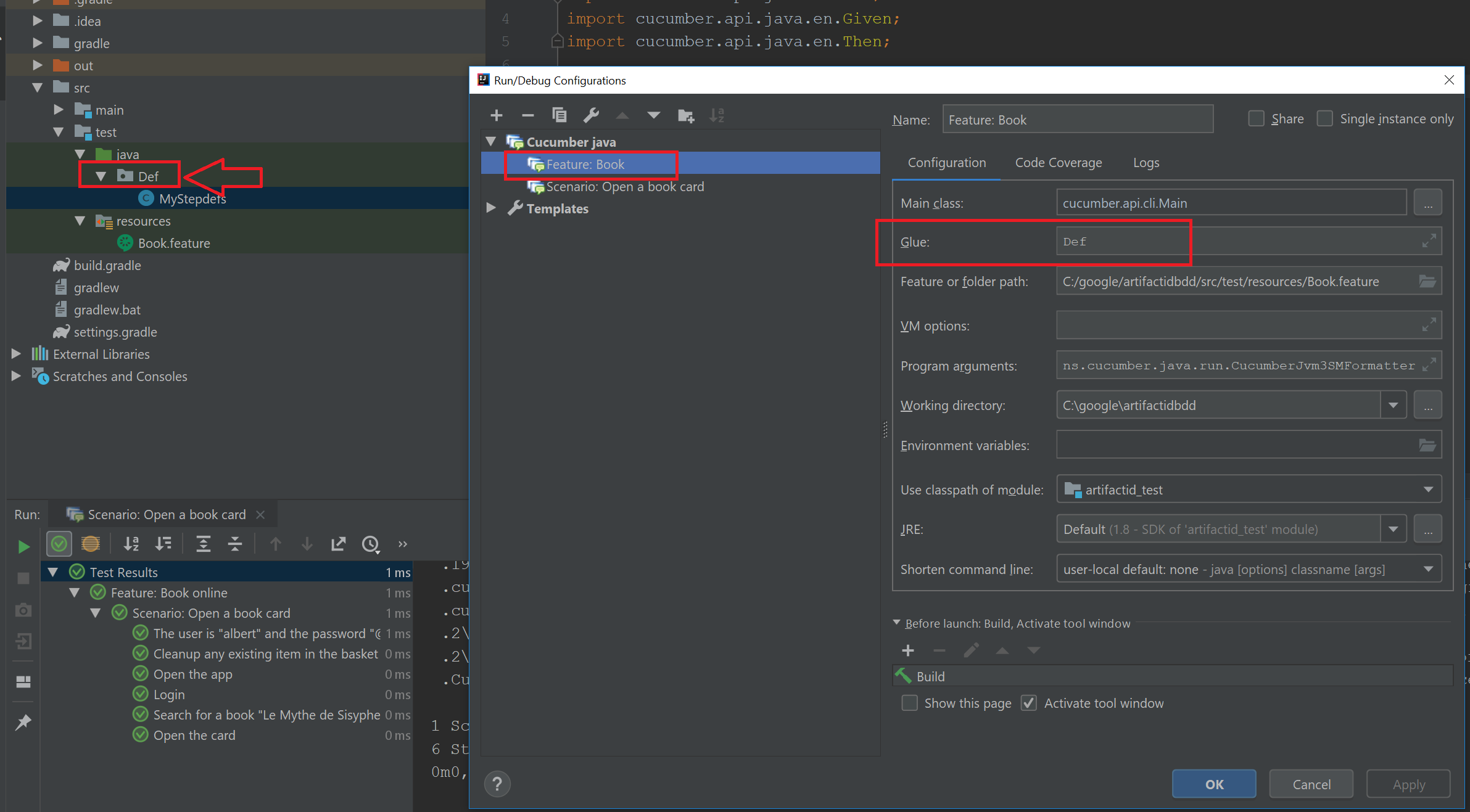

8.Execute the test, no matter if there is nothing implemented in behind

9. The test will pass
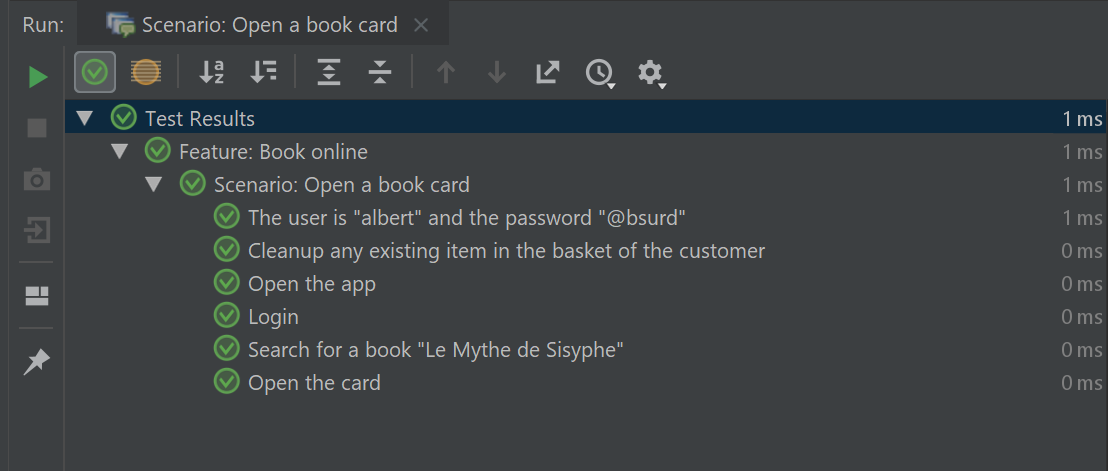
10. Obviously you will ask what to automate. This will see in next post.
 tequila-automation.com